Features
What a server gets with Osmium. Every number here is measured; comparisons have their method on Performance.
On this page
Every hook your plugins expect
841 hooks, the ones Oxide and Carbon plugins look for, all in place before the first plugin loads. Your plugins find what they expect, and calling them costs less.
- Ready at start. Every hook is there before the first plugin loads, including five vehicle-engine hooks and OnClanCreated.
- Fast calls. With 8 plugins listening, a hook call costs about 2 µs per entity, against 5.8 to 6.4 µs on Carbon and 6.9 to 7.5 µs on Oxide (above). A hook no plugin listens to costs about 2 ns.
- Proven before release. Every release is started with all 841 hooks checked before it is published.
Automatic updates
When Facepunch ships a new Rust build, Osmium picks it up within minutes, carries the hooks over and checks every one of them on a running copy of the game. Only then does it publish a signed release. It publishes nothing it cannot prove.
- A new build on Steam. Picked up within minutes, for the public and staging branches.
- Hooks carried over and checked. Every hook your plugins use, on the new build.
- Started before it ships. A copy of the game runs the release, and every hook must answer.
- Signed and published. The release descriptor is signed; servers check the signature and every file’s hash before they use it.
Each server chooses when it takes a release
when-needed | The default. Prepared in the background while the server runs, and applied only when it is really needed: a new game build, a release flagged as a security fix, framework code that changed, or a change to a hook one of its plugins uses. It restarts when nobody is online, or inside your update window after warnings in game. |
|---|---|
staged | Prepared the same way, applied at the next restart. Never restarts the server itself. |
auto | The newest release at every start. |
manual | Never changes. |
pinned | Exactly the version you name. Also how one server rolls back. |
Admin panels, in game and on the web
The in-game panel opens with /panel and shows only the sections a person has permission for. The web panel covers the host side. Both write every consequential action to one audit log, with who did it, to whom, and the result.
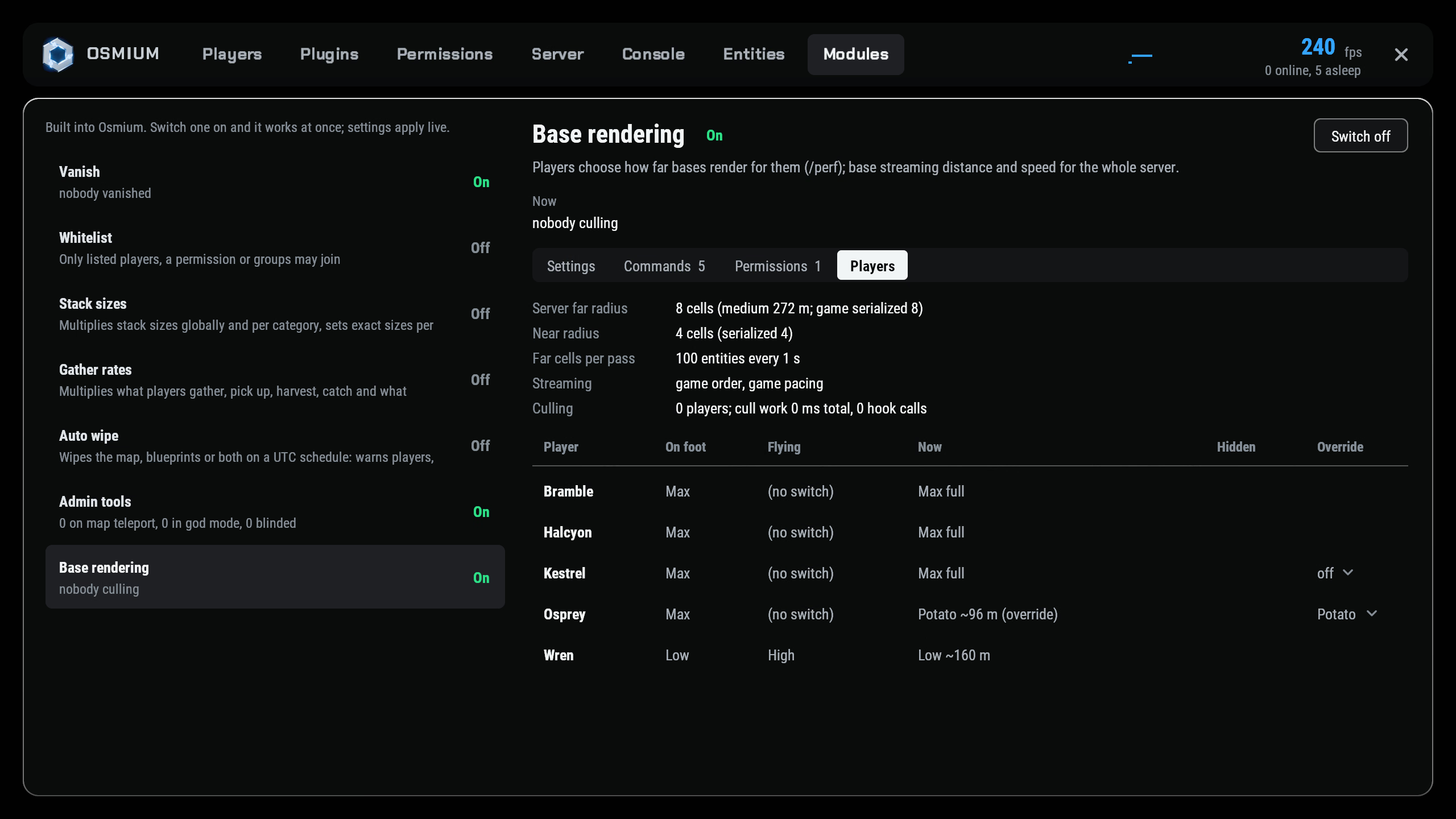
- Players: profile, position on the server’s own map, teleport, spectate, heal, give items, inventory, mute, kick and ban through the game’s own commands.
- Plugins: load, unload, reload, compile errors, time spent in hooks, and a config editor with a typed control per value that keeps a backup of every save.
- Web panel: power, updates, console, files, plugins, backups, wipes and schedules. Its own accounts with roles and invites, argon2id passwords, Steam sign-in, CSRF protection and rate limits. It listens on loopback only; you open it through your own TLS proxy or an SSH tunnel.
Built-in modules
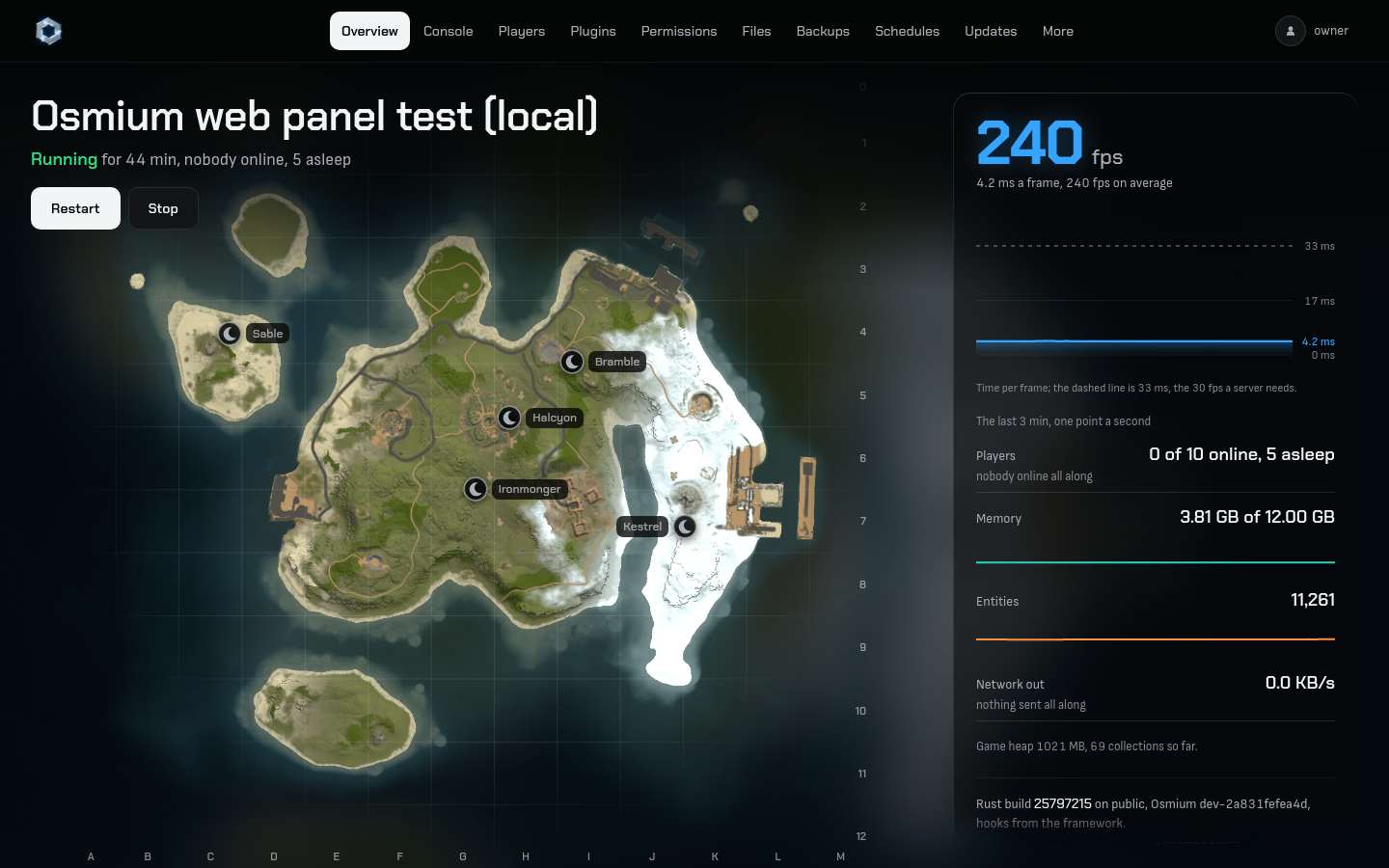
Eight modules ship with every install. Each has one config file that applies the moment you save it, with no reload. Every command a module offers can be renamed, given aliases or switched off, and switching a module off gives everything back.
| Vanish | /v: invisible to players, NPCs, animals, turrets, traps and helicopters; silent; off the team list. On by default. |
|---|---|
| Whitelist | Only listed SteamIDs, a permission or groups get in. Off by default. |
| Admin tools | /tpm, /god, /heal, /blind, /lockinv, /pm. On by default. |
| Stack sizes | Global, per category and per item, protecting items that would lose data. Vanilla restored when switched off. |
| Gather rates | Per source and per item: gathering, pickups, crops, quarries, excavator, fishing; permission bonuses; /rates. |
| Auto wipe | Scheduled map, blueprint or full wipes on UTC rules, with Facepunch’s forced-wipe dates as a preset and notices to players. |
| Base rendering | Faster, farther base streaming and per-player /perf. Below. |
| Osmium credit | One line “Powered by Osmium - osmiummod.com” under your description in the server browser, the tag osmium, and one small chat line for each player once per wipe. Nothing in the game changes. On by default; the egg’s “Osmium credit” option (0) or osmium.module advert off switches it off. |
Base rendering
Players choose how far bases render for them with /perf, from Potato at 96 m to everything the server sends. Lower settings only drop distant bases, and anyone inside a base beyond your distance is hidden too, so a low setting never shows more than it should.
- 0.4 s
- to load a 7,500-entity base after a teleport, against 7.0 s on a stock server, with the streaming options on (immediate cell switch, larger update batch).
- 530 m
- where bases first appear when flying at 40 m/s, against 181 m stock, with base parts on the game’s 64 m network layer and the immediate cell switch. The cost: about 30 ms of main-thread time per second at 50 players.
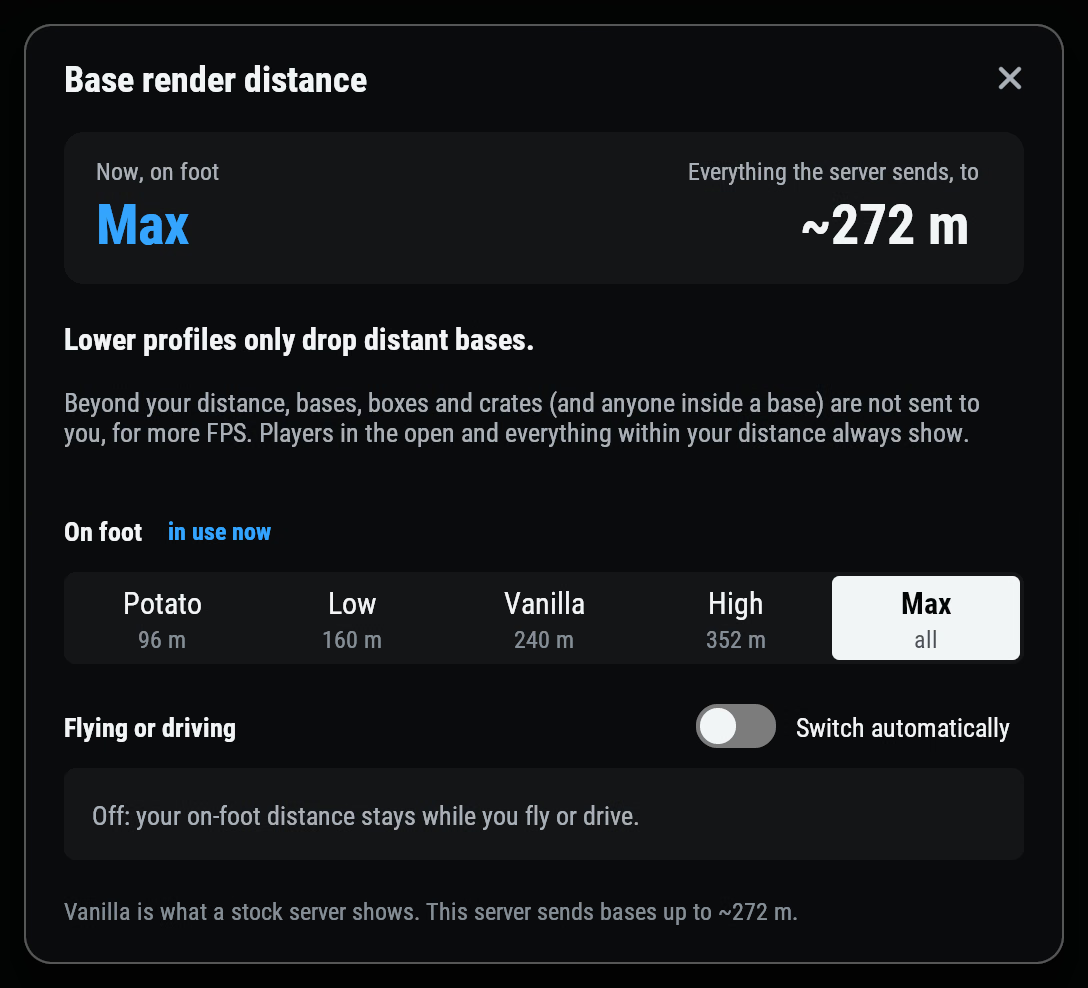
/perf, on a test server with the game’s stock streaming: on foot, Max reaches about 272 m there. The 530 m above is first sight from the air with the streaming options on; the server-wide options are off until the owner sets them.Full sizeServer transfer
Move a player from one of your Osmium servers to another with what they carry: every item with its skin, condition, attachments and contents, health and metabolism, the crafting queue, blueprints (merged) and their team. The servers talk to each other directly over a signed channel; there is no hub and no database.
- Frozen. The player can no longer move items, craft, loot, mount, shoot or build.
- Captured and signed. Their state goes into a ticket bound to the destination, the player and the exact state bytes, valid for 60 seconds.
- Journaled, then rebuilt. The destination writes the ticket to disk before it acts, and answers each ticket once; a retry or replay restores nothing.
- Accepted, then removed. The source removes its copy only on a signed acceptance, and the player’s game reconnects to the destination.
- No duplication, even across crashes. Every phase is on disk before the game acts on it, and the journal keeps the state until a completed world save settles it.
- Off until you set up a network: two files on each server, a list of servers and a shared key.
Native profiler
A profiler that runs inside the game server’s own runtime. It samples CPU time on the main thread or every thread, records every managed allocation with sampled stacks, and times every garbage-collection pause, then breaks it all down by plugin, Osmium module and the game itself.
- Off and free until you start it: nothing is loaded or hooked before the first
osmium.prof start. - From the console or the panel: the commands below, or the panel’s Profiler section, 30 seconds to 5 minutes.
osmium.prof start all 120 label=evening-flights   # CPU, allocations and GC for 2 minutes
osmium.prof status                                # live counters and the top owners so far
osmium.prof report                                # the session, per plugin, module and the game
WASM plugins
Write plugins in Rust and run them next to C# plugins. A WebAssembly plugin is one file in the plugins folder, hot-reloaded when it changes, and listed by the panel like any other. It talks to the server only through the host API.
- Sandboxed. A plugin that crashes, loops forever or runs out of memory is stopped and unloaded; the server and every other plugin carry on.
- A Rust SDK with chat commands, hooks, permissions, timers and UI, and a template to start from.
#[osmium_plugin::plugin(name = "Greeter", title = "Greeter", version = "1.0.0", author = "you")]
impl Greeter {
    // Chat command /hello; replies go back to the caller (chat or console).
    #[chat_command("hello")]
    fn hello(&mut self, cmd: &Command) {
        let Some(player) = cmd.caller() else { return };
        self.greeted += 1;
        cmd.reply(format!("Hello, {}!", player.name()));
    }

    // Hook name from the method name (OnPlayerConnected), arguments by type.
    #[hook]
    fn on_player_connected(&self, player: Player) {
        player.message("Welcome!");
    }
}Osmium Admin in your browser
In early access; paid plans are coming. Run any Rust server from the browser at osmiummod.com/panel, or from the iPhone app in public beta. It reaches a server two ways only: the Osmium Admin Link plugin, end to end encrypted through our Secure Link relay, for the console, players, the map, reports and alerts; and your host panel’s API key, for power, files and backups. There are no accounts. Setting up a browser makes a vault sealed by your passphrase, your keys and pairings stay in it, and you prove a server is yours by running a one-time code on its console.
Pelican egg
One-click Osmium servers on Pelican. The “Rust (Osmium)” egg installs the framework, keeps it current, and takes signed releases from the release server. The update policy, the update window and the Osmium credit are startup variables.
| Update Policy | OSMIUM_UPDATE_POLICY: when-needed by default, or staged, auto, manual, pinned:<version>. |
|---|---|
| Update Window | OSMIUM_UPDATE_WINDOW: a UTC window such as 04:00-06:00; empty means restart only when nobody is online. |
| Osmium credit | OSMIUM_ADVERT: 1 by default (the credit line in the server browser and one chat line per player per wipe); 0 switches it off from the next start. |
Telemetry off by default
Osmium contacts us once, when you accept the Terms of Use at first use. After that it sends us nothing unless you turn a category on, and you can turn it off again at any time. These are all the connections it makes:
| Activation | Once, at first use: your acceptance of the Terms and the server’s identity and platform, which issue its perpetual licence and its analytics token. Nothing is needed from us after that. |
|---|---|
| Analytics, if you turn it on | Error reports, performance detail, and plugin and configuration upload, each off by default (Terms, section 6). Never player names, SteamIDs, player IP addresses or chat. |
| Steam | Game updates, and Steam sign-in on the web panel when someone uses it. |
| The release server | Osmium updates, checked against their signatures. |
| Your own servers | Transfers, when you set up a network. |
| Your plugins | Whatever they request themselves, as on any framework. |